


Viewsonic VP3256-4K 32" Professional IPS Monitor 4K UHD, USB-C 60W, Pantone Validated
VP3256-4K


Payment plans from Affirm, learn more
- Viewsonic
- Shipping Calculated at checkout, most in stock products ship same day

Pantone Validated Display
For professionals who require color fidelity in every pixel, Pantone® Validated ViewSonic® displays offer pinpoint color accuracy.
Each Pantone Validated display has been rigorously tested and deemed capable of reproducing the Pantone Matching System (PMS) Colors. Whether it’s film editing, graphic design or other jobs where color is critical, these certified displays are built to eliminate guesswork and help you create with confidence, so you can finish your assignments with flying colors.
ViewSonic, X-rite and Pantone worked to provide creatives a way to confirm a monitor’s Pantone Color rendering capability. If you count on color accuracy, count on a Pantone Validated display.
Look for the Pantone Validated mark on an increasing number of professional color devices.

Designer Mode
The Designer Mode setting calibrates the monitor to the sRGB color gamut: an ideal setting for creating digital images and graphics for web. The Color Profile can be easily selected using vDisplayManager software or the OSD.
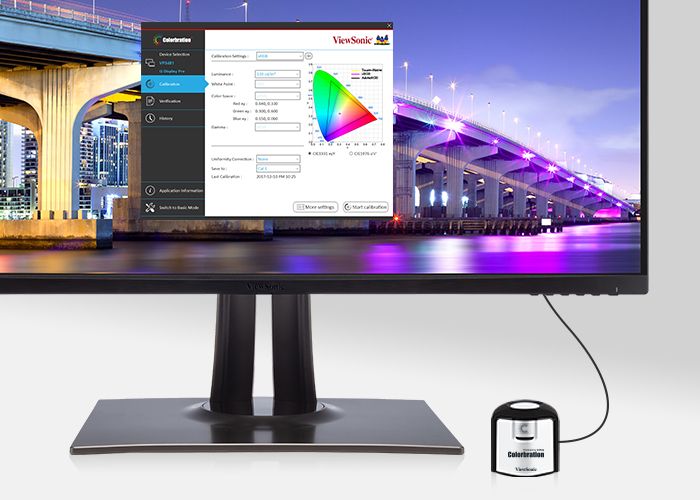
Factory Calibrated
We know color accuracy is of utmost importance to creative professionals. With any compatible calibration kit*, you can quickly and easily calibrate this monitor to maintain its color accuracy. You’ll be able to focus on your work with complete confidence that the color displayed perfectly matches your original image or digital file.
*See user guide

vDisplayManager with Color Sensitivity Mode
Integrated vDisplayManager software enhances productivity by putting the On-Screen Display (OSD) menu controls on your monitor’s screen. This delivers a more comfortable viewing experience by allowing you to quickly and easily adjust display settings such as volume, brightness, contrast, and more. A Color Sensitivity feature allows content creators to simulate various color deficiency modes.
*The image contained herein is simulated to reflect an image under different resolution (or scheme) for demonstration purposes only, and may not be the actual image displayed from the product.
